General Weapon Information
Aside from the actual purchase, the use of weapons on the server is directly influenced by your character's experience and your mastery level with each individual piece of equipment.
Progression System (Weapons Skill & Mastery)
The progression menu can be accessed in two ways: either directly from the game interface by navigating to My Stuff -> Mastery tab, or more quickly by typing the /mastery command in chat.
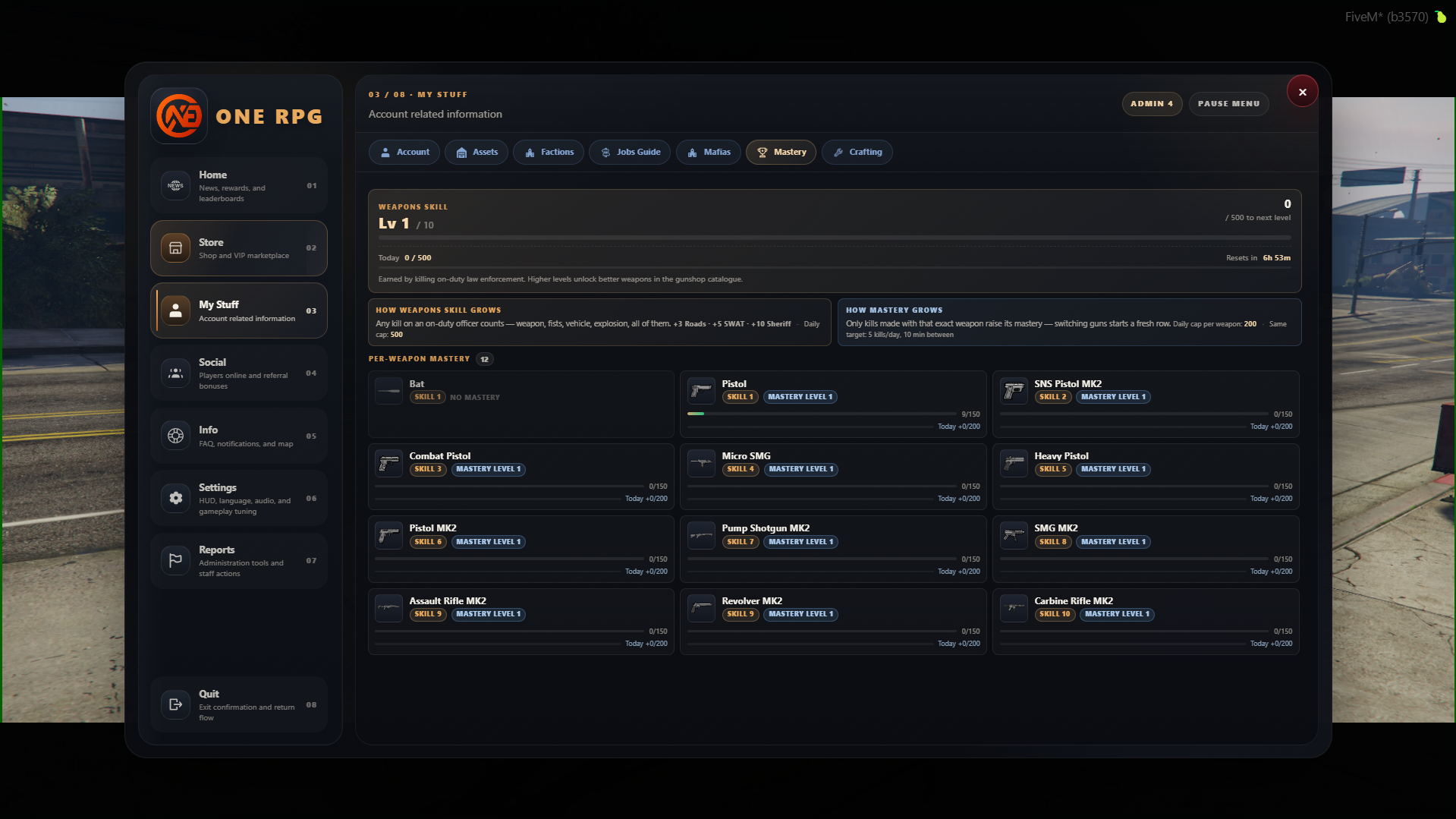
Weapons Skill (General Level)
- What it represents: Displays your global weapon skill level (from Lv 1 to 10) and the accumulated experience points (ex 92 / 140 XP).
- Utility: Leveling up unlocks increasingly powerful weapons in the Gun Shop catalog.
- How it grows:
- By killing police officers (with guns, fists, explosives, drive-bys, etc.) or by shooting at the Gun Shop range.
- You can also earn experience if you are in The Company (from contracts you finish) or from the daily range drill.
- For on-duty law enforcement officers: By killing or arresting wanted suspects.
- Specific Points: Each action awards different points:
+6 Roads,+10 SWAT,+20 Sheriff,+6 Wanted suspect,+6 Arrest,+6 Bounty kill, and18/d Range drill.
Weapon Mastery
- What it represents: Mastery is per weapon and applies exclusively to Gun Shop weapons. Each weapon model's progress grows based on the weapon you actually use.
- Unlock Requirements: Advanced weapons in the list remain locked until you reach the required global level (ex Combat Pistol requires
REQUIRES SKILL 3, while SMG MK2 requiresREQUIRES SKILL 8). - Rules & Restrictions:
- Points & Sources: The point sources are the same as for Weapons Skill.
- Target & Arrest Limits:
Same target: 5 kills · 2 arrests. - Cooldown: There must be a pause of at least 10 minutes between accumulated points (
10 min between).
Daily Caps
- General Skill Cap: You can accumulate a maximum limit of 30 XP per day for the general skill.
- Weapon Mastery Cap: You can accumulate a maximum of 10 XP per day per weapon (
Daily cap / weapon: 10). - The counter will constantly show you the remaining time until these limits reset (ex Resets in 4h 41m).
Equipment Management
If you have weapons you no longer use or want to interact with items confiscated by the police, you can access the equipment management interface.
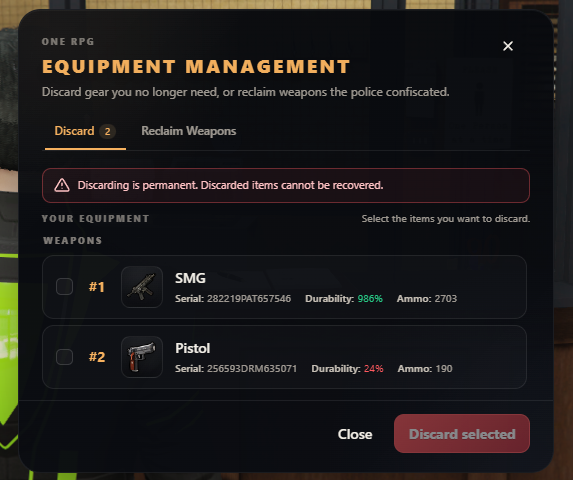
The interface is structured into two main tabs:
- Discard: The section where you can view your current inventory weapons along with their index number, icon, name (ex SMG, Pistol), unique serial number (
Serial), percentage durability (Durability), and remaining ammo (Ammo). - Reclaim Weapons: The section dedicated to recovering or repurchasing weapons previously confiscated by law enforcement.
Caution regarding weapon destruction
Deleting weapons through the destruction action is permanent. Once you select the checkboxes of the desired weapons and press the Discard selected button, the items are permanently eliminated and cannot be recovered!