Mafia System
Any player who wishes to establish their own illegal organization can do so either by purchasing the package from the server shop (/shop) or by using the direct command (/createMafia). Both methods will open the configuration and registration menu for the new family.
Initial Configuration
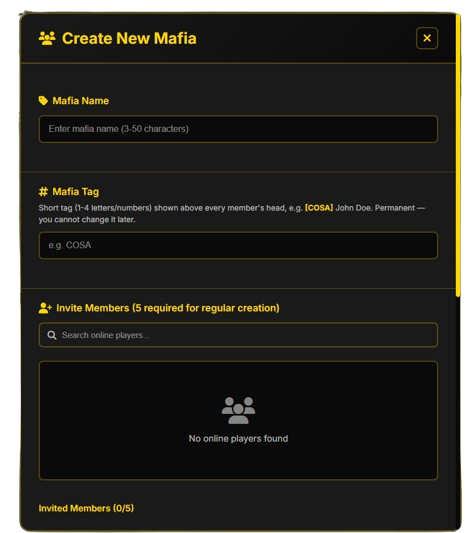
In the main registration screen, you will need to fill in the following mandatory details:
- Mafia Name: Must be a unique name on the server, with a length between 3 and 50 characters.
- Mafia Tag: A short acronym consisting of 1-4 letters or numbers. This will be permanently displayed above members' heads (ex [COSA] John Doe).
Warning
The chosen Tag is permanent and cannot be modified later!
- Invite Members: For standard creation, you need to search the list and invite a minimum of 5 online players (you will form a team of 6 people, including yourself).
Creation Methods and Requirements
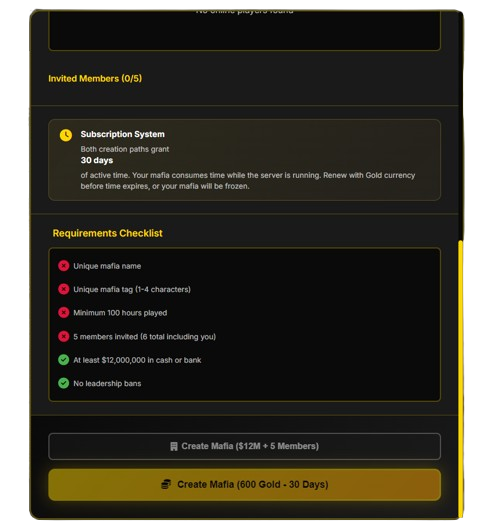
The menu offers two distinct paths to found the organization. Regardless of the chosen method, both options automatically grant you an initial package of 30 active days for the mafia.
1. Standard Creation ($12,000,000 + 5 Members)
To unlock the Create Mafia ($12M + 5 Members) button, you must fully satisfy the following Requirements Checklist:
- [x] Unique Mafia Name.
- [x] Unique Mafia Tag (1-4 characters).
- [x] Playtime of minimum 100 hours on the server.
- [x] 5 invited members who are currently online (6 total including the leader).
- [x] Possess at least $12,000,000 in cash or bank account.
- [x] No active leadership bans.
2. Premium Creation (600 Gold)
If you choose to use the Gold option via the Create Mafia (600 Gold - 30 Days) button, you can instantly found the mafia, bypassing some of the strict in-game money or minimum online member requirements at the exact moment of creation.
Subscription & Validity System
At creation, the initial lifespan of the organization is the same (regardless of whether the mafia will become Official or remain Unofficial):
Time Management & Expiration
- Upon creation, all mafias start with a validity period of 30 days.
- Time is consumed only while the server is running.
- Unofficial Mafias: You must renew the period before the 30 days expire, otherwise the mafia will be frozen or deleted.
- Official Mafias: Once a mafia becomes Official, it no longer has any expiration term and doesn't have to pay anything. It remains official as long as it stays in 1st or 2nd place on the leaderboard; it only becomes/appears unofficial if it drops below 2nd place.
Promotion System: From Unofficial to Official
There is fierce competition among organizations on the server. Official mafia status cannot be bought; it must be earned through pure illegal activity.
Leaderboard Reset & Condition
Every 2 weeks, the general leaderboard score resets completely. The top 5 mafias with the highest scores at that moment will become (or remain) Official Mafias.
Points required for the leaderboard are earned by completing the following activities:
- Turfs owned (controlling zones on the map).
- Completed drug deliveries (from controlled laboratories).
- Successful raids on rivals' illegal businesses.
- Airdrops won (see details in the Airdrop System).
Status Differences and Benefits
Unofficial Mafia Benefits
This is the baseline status for any newly created organization. Unofficial mafias have access to:
- Owning a Headquarters (HQ).
- Capturing and holding only small turfs (Small Turfs).
- Participating in Airdrop events.
Official Mafia Benefits
Representing the server's elite, official mafias enjoy a huge strategic advantage:
- Owning a Headquarters (HQ).
- Guaranteed access to all benefits of unofficial mafias.
- Participating in Airdrop events.
- Owning illegal businesses specially designed for money laundering.
- Exclusive access to Drug Laboratories (Weed Laboratory, Coke Laboratory, Meth Laboratory).
Interface /mafia (Organization Menu)
Once the mafia is created, all members can access the central command panel using the /mafia command. This opens a complex dashboard centralizing all group statistics, resources, and settings.
Navigation Tabs
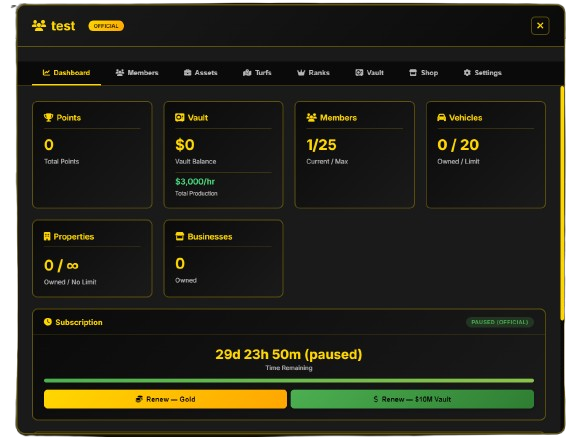
The top menu is divided into specific sections for efficient management:
- Dashboard: Main page with general statistics and subscription status.
- Members: Complete list of members, their online/offline status, and invitation management.
- Assets: Centralizer of goods owned by the mafia (vehicles, properties).
- Turfs: Monitoring controlled territories on the map and turf wars.
- Ranks: Configuring mafia ranks and detailed permissions for each rank.
- Vault: Faction vault for depositing/withdrawing money and materials.
- Shop: Dedicated shop for upgrades and illegal perks.
- Settings: Administrative settings (description change, leader management, disbanding, etc.).
Statistics Panel (Dashboard Widgets)
The first page displays the most important logistical information in real time:
- Points: Total points accumulated by the mafia (used in leaderboards and competitions).
- Vault: Current vault cash balance and passive production rate (ex $3,000/hr Total Production).
- Members: Current member count relative to max capacity (ex 1 / 25).
- Vehicles: Number of vehicles owned in the garage out of the max limit (ex 0 / 20).
- Properties: Real estate properties (houses/HQ) controlled, with no upper limit (0 / ∞).
- Businesses: Number of businesses owned or protected by the mafia.
Managing Validity (Subscription & Renew)
At the bottom of the dashboard is the area dedicated to tracking the mafia's active duration.
Leader Permission
Only the Mafia Leader has permission to extend the organization's validity or use vault funds for this action.
- Special Status: Depending on server activity, time may appear as paused.
- Renewal Buttons: When validity nears expiration, the leader can renew directly from the interface:
- Renew - Gold: Renewal using Gold coins.
- Renew - $10M Vault: 30-day package renewal using $10,000,000 extracted directly from the Vault Balance.
Member Management (Members Tab)
The Members tab allows complete administration of the team. Here you can manage invitations, salaries, ranks, and member logs.
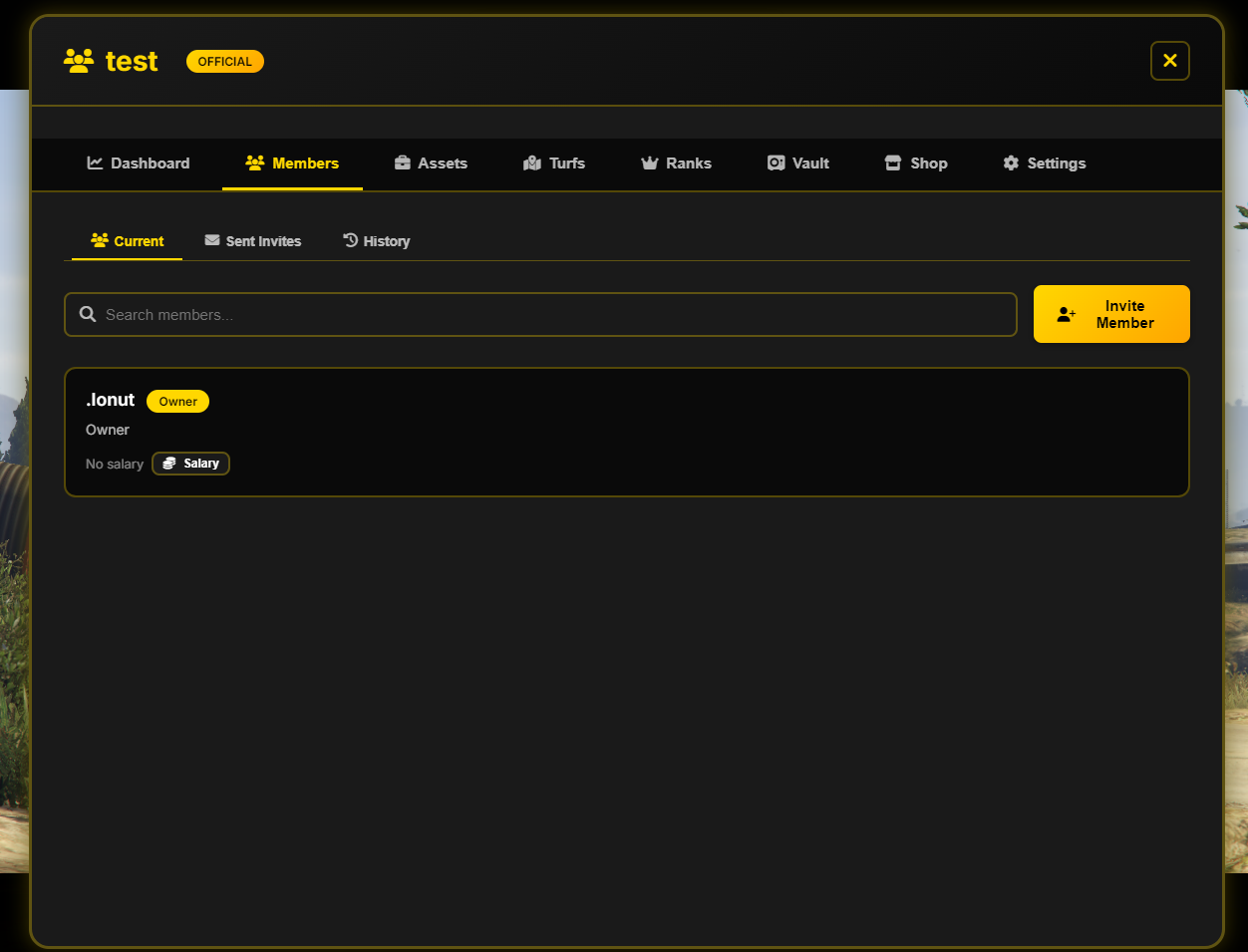
The secondary menu in this section offers three sub-tabs:
- Current: Displays the complete list of current members. Each member card shows their name, rank (ex Owner), and salary status. Individual details can also be edited here.
- Sent Invites: Allows viewing and canceling active invitations sent to players who haven't accepted or declined yet.
- History: An activity log recording administrative actions related to members (joins, leaves, promotions, demotions, or kicks).
Actions & Features
- Quick Search: The
Search members...search bar allows instant filtering by name. - Add Members: Pressing the yellow
+ Invite Memberbutton allows leaders or authorized ranks to invite an online player. - Salary System: Manage periodic salaries paid automatically to members from faction funds.
Asset Management (Assets Tab)
The Assets section represents the logistical hub, granting leaders and members control over vehicles, real estate, and controlled businesses.
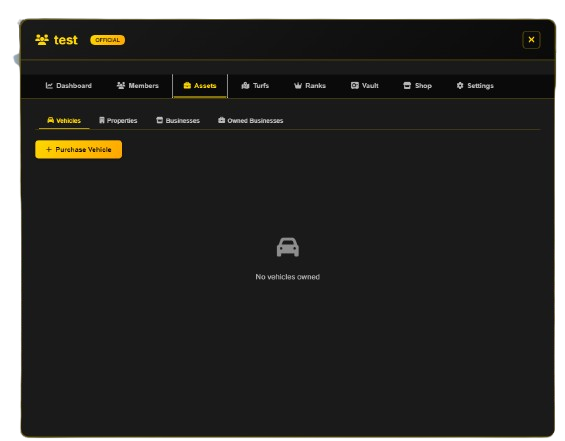
The secondary menu is divided into four main categories:
- Vehicles: Displays all faction-owned vehicles. Via the
+ Purchase Vehiclebutton, leaders can buy new vehicles for members. - Properties: Manage houses, HQs, or warehouses owned by the organization.
- Businesses: General list of server businesses available to bring under influence/protection.
- Owned Businesses: Centralizes businesses directly owned by the organization generating profit.
Territory Control (Turfs Tab)
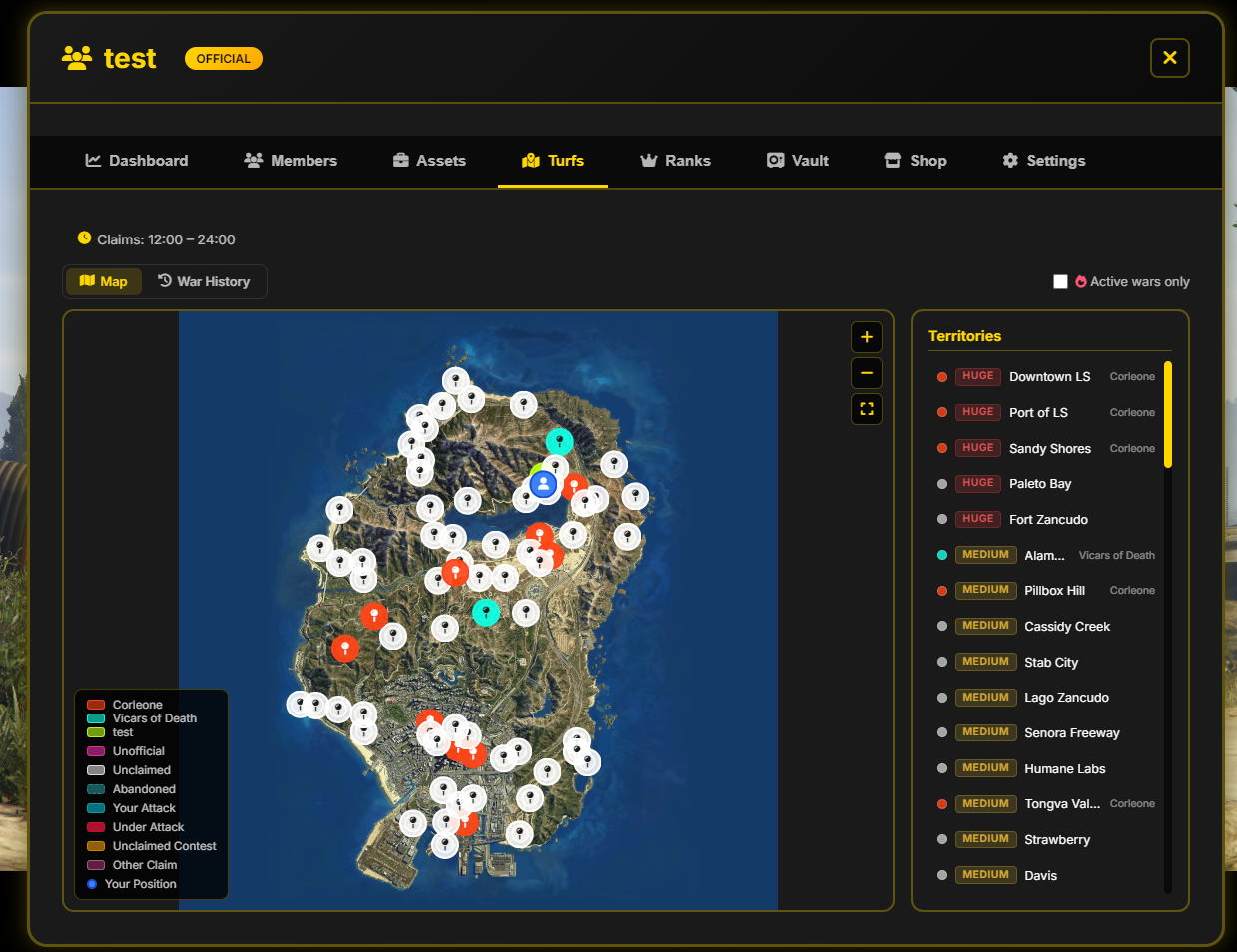
The Turfs tab provides an interactive map to monitor, attack, and claim influence zones across the server. Controlling territories provides substantial passive income and prestige.
General Rules and Time Schedule
Attacks and territory claims can only be initiated during specific time windows based on turf size:
- Small Turf: Attacks are open between 12:00 – 22:00.
- Medium Turf: Attacks are open between 18:00 – 22:00.
-
Huge Turf: Attacks are open between 20:00 – 24:00.
-
Quick Filter: The
Active wars onlyoption hides neutral zones and displays active conflict zones. - History: The
War Historysub-tab displays past wars, scores, and territories won or lost.
Golden Rule: Wanted Restrictions
Antidrop and Combat System
Members who have a Wanted level (wanted by police) are automatically blocked by the system. They CANNOT participate in Turf Wars or Airdrop events.
Status Panel and Colors
The bottom-left legend indicates the status of each point of interest:
- Family Name (ex Corleone, Vicars of Death): Territories officially controlled by those mafias.
- Unclaimed: Free (neutral) territories waiting to be claimed.
- test: Color assigned to your own mafia (shows your owned zones).
- Your Position: Your real-time location on the map.
- Your Attack / Under Attack / Unclaimed Contest / Other Claim: Active war indicators.
Turf Types, Schedule, and Attack Requirements
Territories are classified into 3 distinct categories. To initiate or maintain an active attack, your organization must have a minimum required number of members present on site within the permitted schedule:
| Turf Type | Panel Size | Attack Time Window | Minimum Participants Required | Who can hold it? |
|---|---|---|---|---|
| Small Turf | SMALL | 16:00 – 22:00 | Minimum 2 players | Unofficial & Official Mafias |
| Medium Turf | MEDIUM | 18:00 – 22:00 | Minimum 3 players | Exclusively Official Mafias |
| Huge Turf | HUGE | 20:00 – 22:00 | Minimum 5 players | Exclusively Official Mafias |
Automatic Fail System (Abandonment)
If due to deaths, crashes, or leaving the area, the minimum required members for that turf size is no longer met, the system triggers an alert. You have a maximum 30-second window to return to the turf, otherwise the war automatically ends in failure.
Claiming an Unclaimed Territory
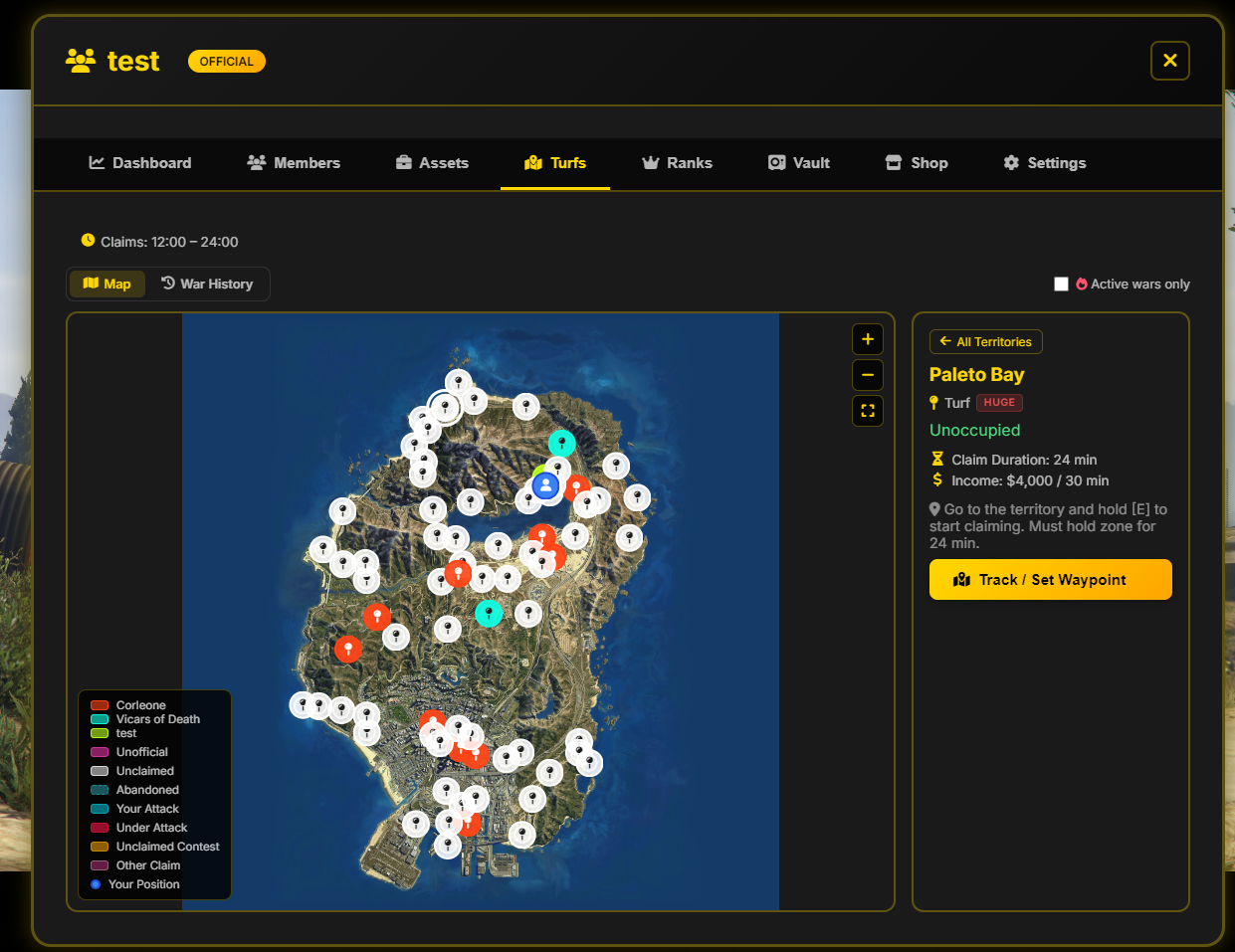
Selecting a territory on the map (ex an unoccupied zone like Paleto Bay) switches the right panel to an action and economic detail screen.
Selected Zone Information
- Name and Size: Shows location name and type (ex Paleto Bay - Turf HUGE).
- Status: Indicates if the zone is occupied or Unoccupied.
- Claim Duration: Time required to secure the area (ex 24 minutes).
- Income (Passive Income): Passive cash generated into the vault if held (ex $4,000 / every 30 minutes).
How to Start a Claim?
- Select a zone on the map and click the yellow Track / Set Waypoint button for a GPS route.
- Travel with your crew (respecting minimum member requirements and time schedule) inside the area.
- Locate the 3D floating text marker inside the perimeter.
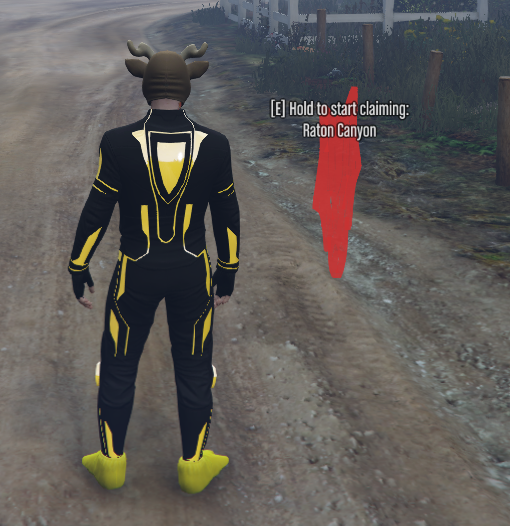
- Stand next to the marker and hold the [E] key (Hold to start claiming) to officially start the claim.
- Winning Condition: Maintain control and survive inside the zone for 24 minutes without being wiped out or contested by another mafia.
War Mechanics (Rival Turf War)
When a mafia attacks a territory owned by another organization, battle takes place through a dynamic direct confrontation system. The game mode is decided democratically at the start by all participants.
1. Voting for the Game Mode (VOTE FOR THE GAME MODE)
Upon initiating a turf war, all participants see the VOTE FOR THE GAME MODE screen (Your crew decides how this battle will be fought). Players have a limited time (ex 16 seconds) to vote for 1 of 3 modes. Tied or empty votes result in a Random pick.
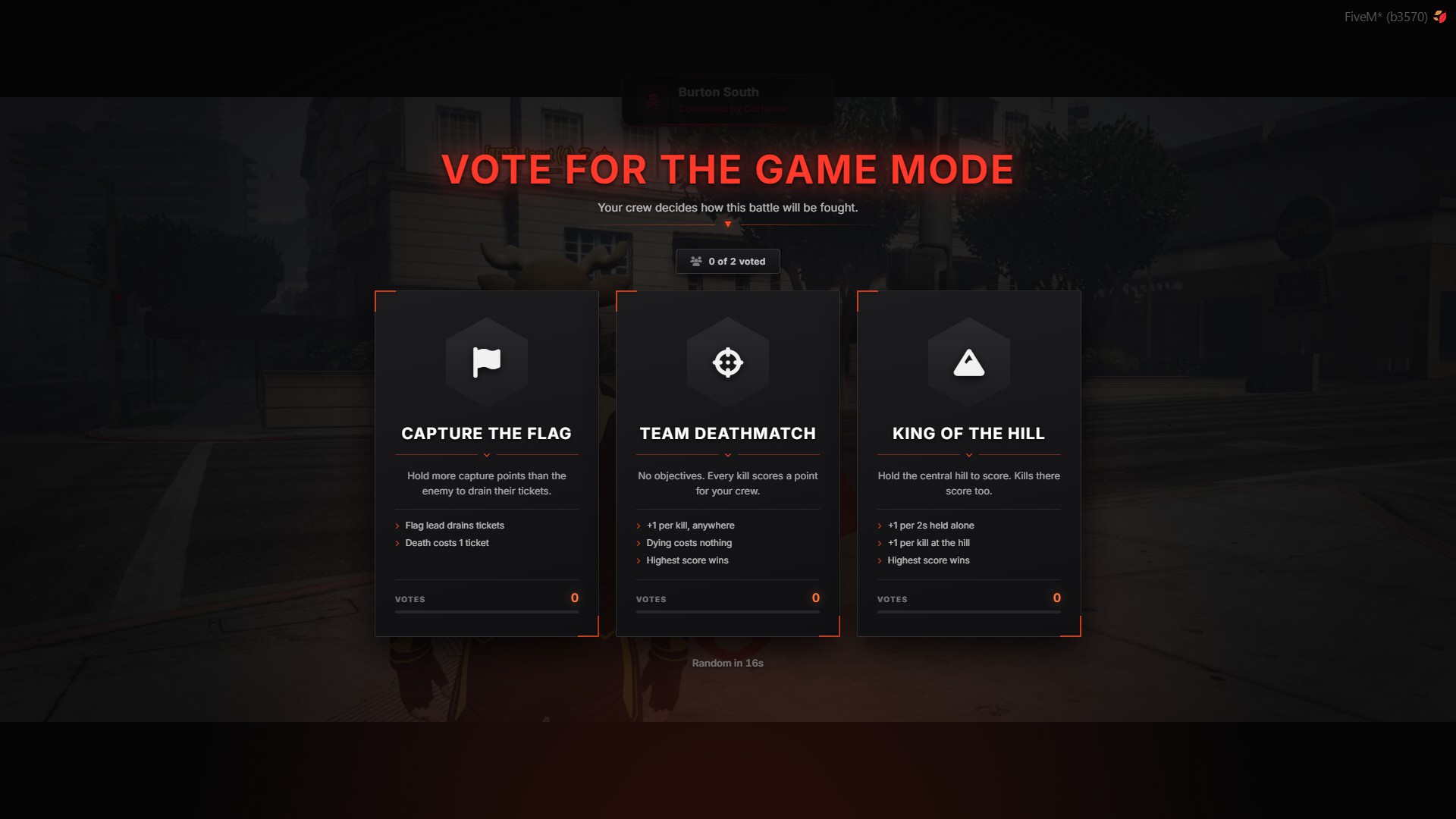
Available Game Modes:
- CAPTURE THE FLAG:
- Objective: Control capture points (flags) to drain enemy tickets.
- Mechanics: Each held flag gradually drains opponent tickets (Flag lead drains tickets).
- Penalty: Each team death costs 1 ticket (Death costs 1 ticket).
- TEAM DEATHMATCH:
- Objective: Direct elimination match with no map objectives (No objectives).
- Mechanics: Every kill anywhere on the map awards +1 point to your team (+1 per kill, anywhere).
- Costs: Dying does not penalize score (Dying costs nothing).
- Victory: Highest score at match end wins (Highest score wins).
- KING OF THE HILL:
- Objective: Capture and hold the central hill/zone.
- Mechanics: Holding the hill grants +1 point every 2 seconds (+1 per 2s held alone).
- Bonus: Kills inside the hill zone grant +1 extra point (+1 per kill at the hill).
- Victory: Highest score at match end wins (Highest score wins).
2. Selecting Equipment (CHOOSE YOUR LOADOUT)
Right after voting, participants enter the loadout screen (CHOOSE YOUR LOADOUT - Pick your kit for this war, then deploy).
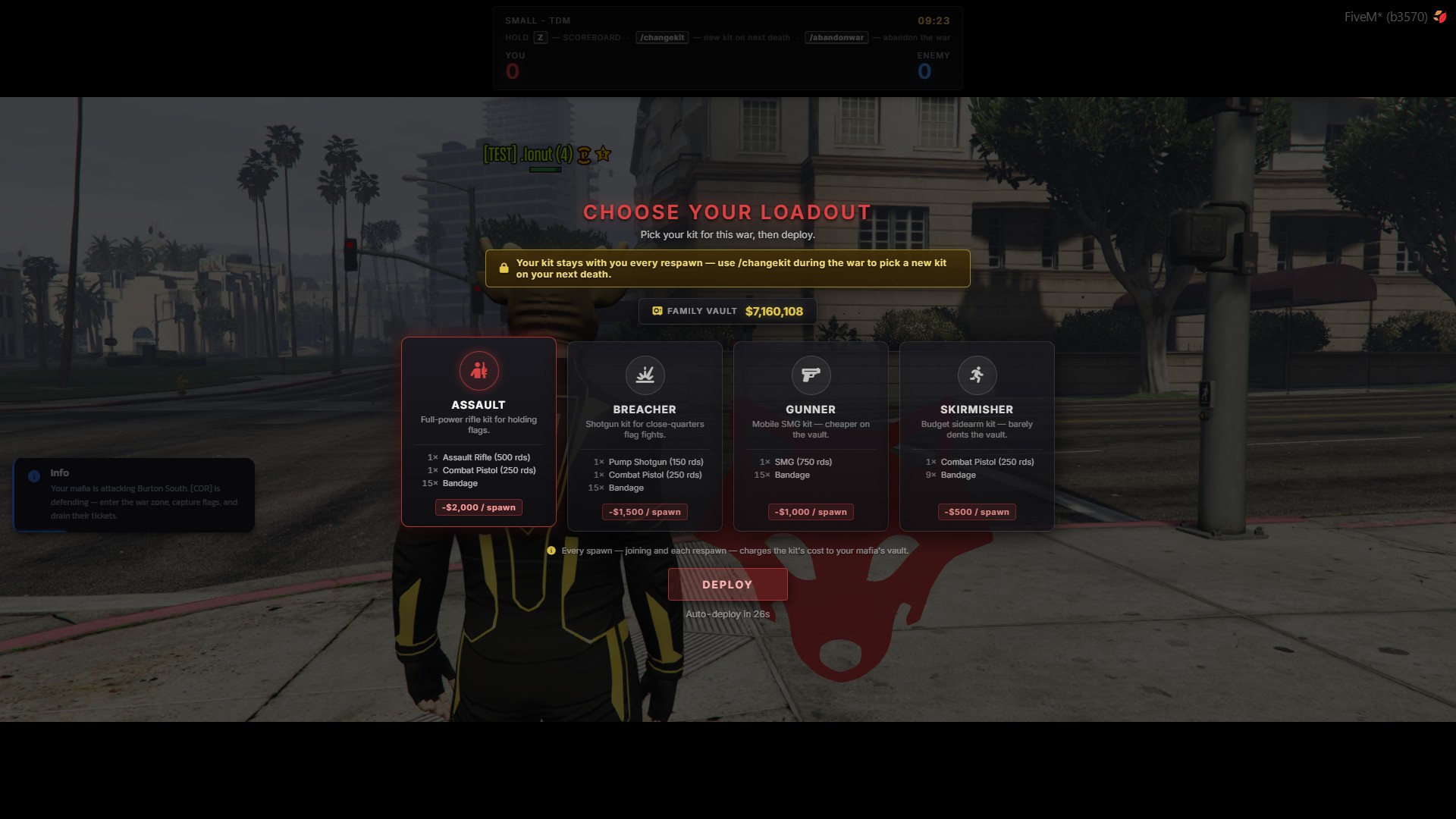
Vault Costs & Changing Kits
- Vault Costs: Every spawn (initial spawn and respawns) automatically deducts funds from your
FAMILY VAULT. - Kit Persistence: The chosen kit remains active upon respawning throughout the match.
- Changing Kits: Use the
/changekitcommand during war to switch equipment for your next life.
Choose from 4 available loadouts:
| Kit Name | Description / Role | Equipment | Vault Spawn Cost |
|---|---|---|---|
| ASSAULT | Full-power rifle kit for holding flags. | 1x Assault Rifle (500 rds) 1x Combat Pistol (250 rds) 15x Bandage |
-$2,000 / spawn |
| BREACHER | Shotgun kit for close-quarters flag fights. | 1x Pump Shotgun (150 rds) 1x Combat Pistol (250 rds) 15x Bandage |
-$1,500 / spawn |
| GUNNER | Mobile SMG kit — cheaper on the vault. | 1x SMG (750 rds) 15x Bandage |
-$1,000 / spawn |
| SKIRMISHER | Budget sidearm kit — barely dents the vault. | 1x Combat Pistol (250 rds) 9x Bandage |
-$500 / spawn |
Click the yellow DEPLOY button to join the fight. If time runs out, auto-deploy triggers automatically (Auto-deploy in 26s).
3. Special Combat Mechanics & Match Dynamics
Turf wars feature unique gameplay mechanics and tactical advantages:
- Progressive Flag Opening: In capture modes, flags do not open all at once; they unlock progressively as the match unfolds.
- Side Switch (Switch Sides): At the halfway point of the war, teams automatically swap sides/zones on the map.
- Spawn Buff & Protection: Upon respawning, players gain temporary spawn protection (invulnerability) plus a 1.5x Damage Multiplier while staying near their spawn zone.
4. Quick Commands, Scoreboard, and Gameplay Flow
During war, players can use quick controls and special commands:
HOLD Z— Hold Z to open the WAR SCOREBOARD./changekit— Queue a new kit selection for your next life (new kit on next death)./abandonwar— Leave the active war instance (abandon the war).
Scoreboard (WAR SCOREBOARD)
Holding Z displays individual participant performance:
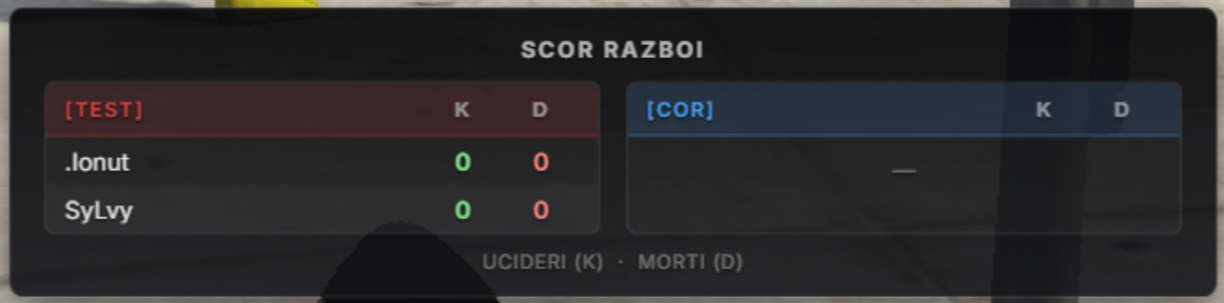
- Team Rosters: Displays members of both opposing mafias (ex
[TEST]vs[COR]). - K (Kills): Individual kill count.
- D (Deaths): Individual death count.
Removal of 'You Died' Screen
The legacy "You Died" screen no longer appears. Players instantly queue for respawn upon death, keeping combat fast-paced.
5. War HUD Elements and Victory
A dedicated war interface adapts to the selected game mode:

- Turf Size & Mode (Top-Left): Shows turf type and current mode (ex SMALL - TDM, HUGE - CTF).
- Score Bar (YOU vs ENEMY): Tracks team tickets or points in real time (ex YOU: 0 | ENEMY: 0).
- Objective / Flag Indicators: Displays active capture points on the minimap.
- Timer (Top-Right): Time remaining in match (ex 09:23).
The team reaching mode objectives or holding the highest score when time expires wins the war and claims the turf!
Resource Management (Vault Tab)
The Vault tab serves as the organization's treasury. Authorized members can manage cash, Gold resources, and monitor money laundering operations.
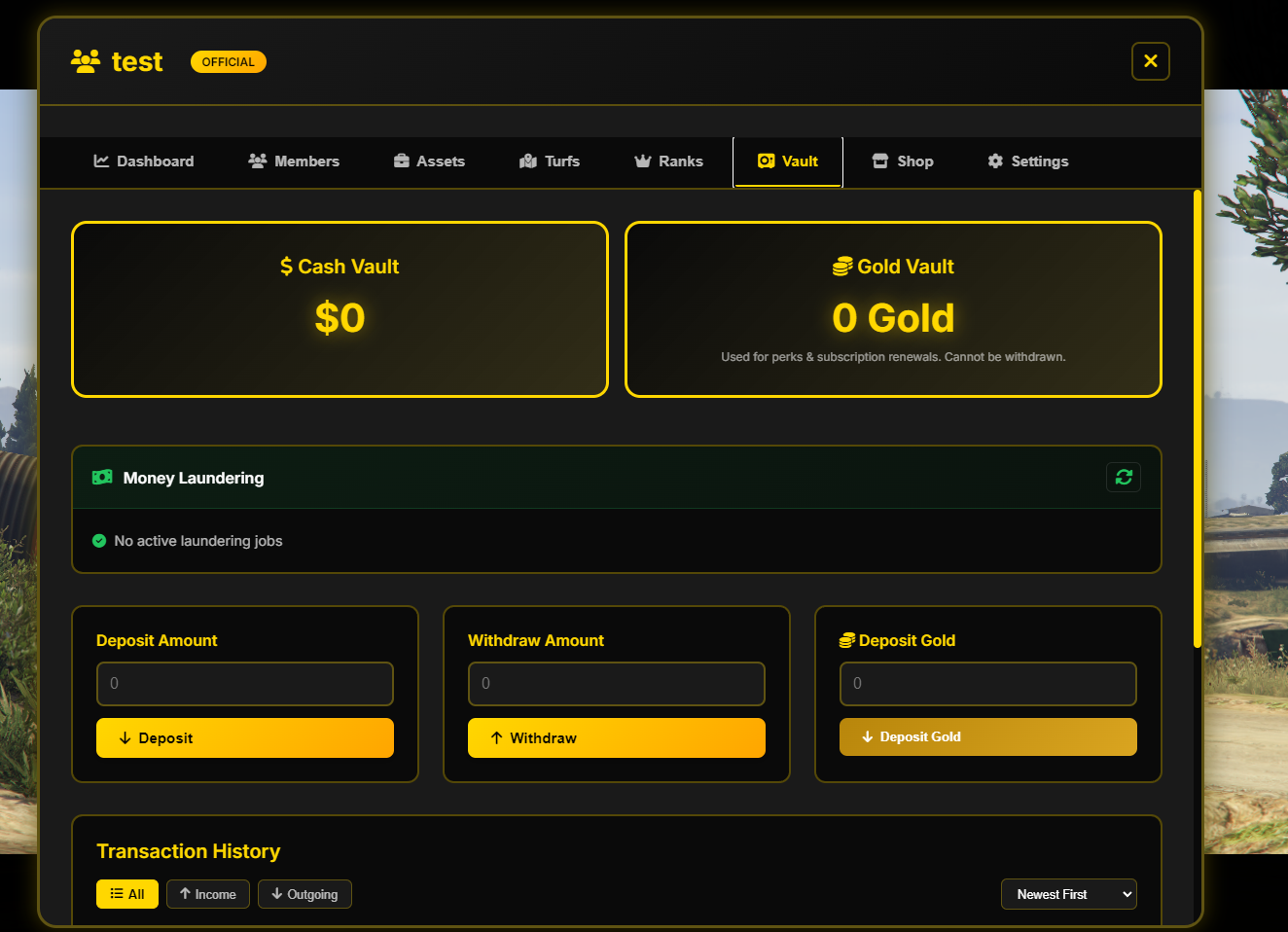
Storage Categories
- Cash Vault: Total dirty/clean money stored. Used for salaries, vehicle purchases, or extending validity.
- Gold Vault: Amount of Gold stored. Used exclusively for upgrades, premium perks, and subscription renewal. Note: Deposited Gold cannot be withdrawn!
Money Laundering System
Official mafias have access to a Money Laundering section inside this tab:
- Job Status: Real-time status of active laundering processes (ex "No active laundering jobs").
- Refresh Button: Instantly update job processing status.
Direct Actions & Transactions
- Deposit Amount: Enter cash amount and press yellow Deposit.
- Withdraw Amount: Enter cash amount and press yellow Withdraw (restricted permissions).
- Deposit Gold: Enter Gold amount and press yellow Deposit Gold to transfer personal Gold to the permanent vault balance.
Transaction History
A complete ledger logs every fund movement. Sort and filter using options like All, Income, or Outgoing with chronological ordering (Newest First).
Benefits Shop (Shop Tab)
The Shop tab opens the Gold Perks Shop, allowing leaders to buy logistics upgrades and passive bonuses using Gold stored in the Gold Vault. Available perks vary based on official or unofficial status.
Common Benefits (Available to All Mafias)
- Custom Outfit (200 Gold / month): Unlocks custom mafia clothing for all members. Note: May appear Disabled depending on server configuration.
- Reduced Sentences (200 Gold / month): Reduces prison sentence time by 10% for all members.
- Member Revenue Share (500 Gold / month): Automatically redirects 5% of member earnings into the cash vault.
- Transfer Ownership (100 Gold - One-time): Transfer mafia ownership to another member.
Exclusive Benefits for Unofficial Mafias
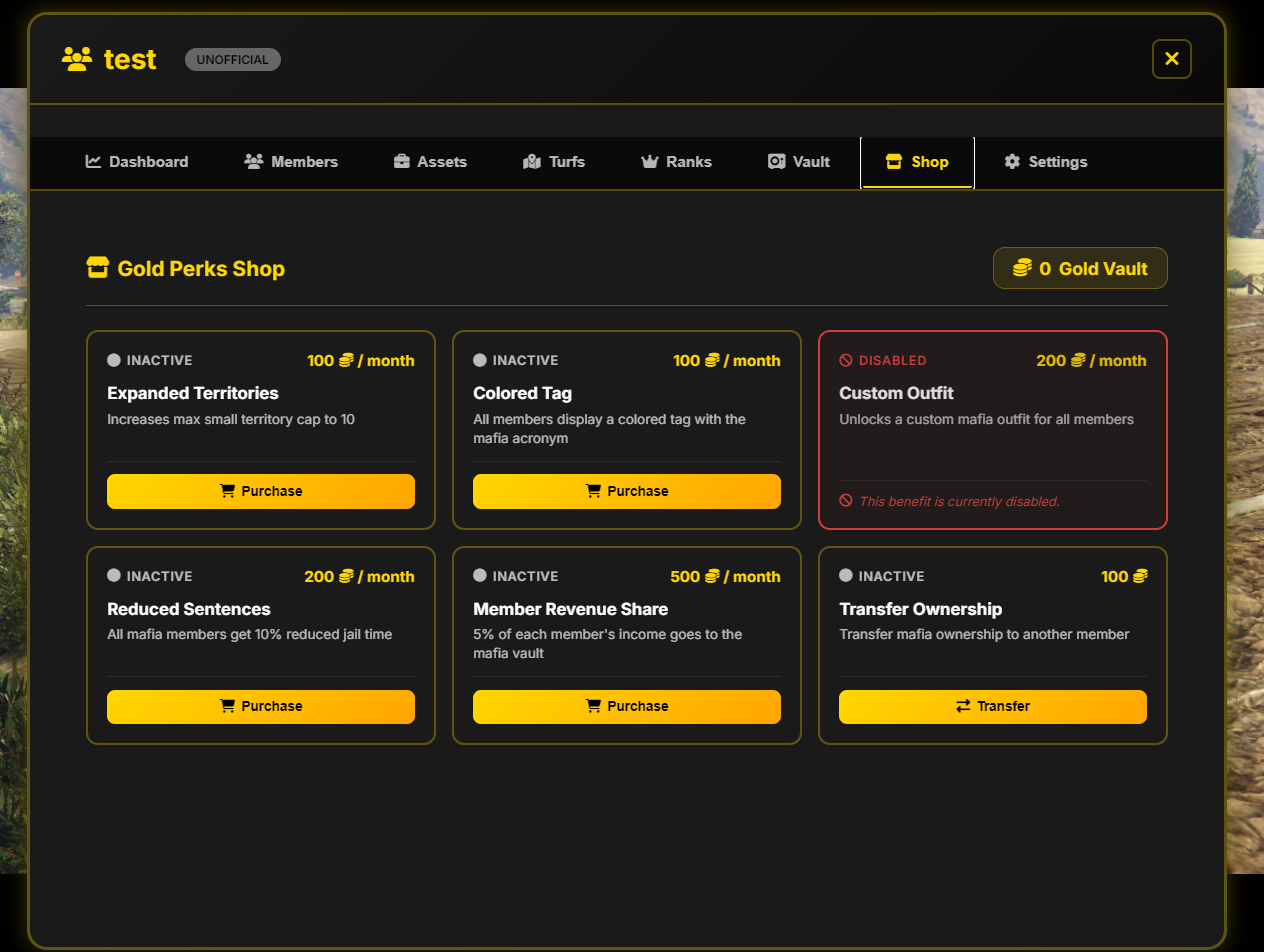
- Expanded Territories (100 Gold / month): Increases max small turfs limit to 10 controlled zones.
- Colored Tag (100 Gold / month): Customize tag text color displayed above members' heads.
Official Mafia Interface
Promoting to Top 5 recalibrates the shop automatically. Since official mafias inherently control large turfs and advanced mechanics, territory expansion and tag color options are removed, focusing on core perks:
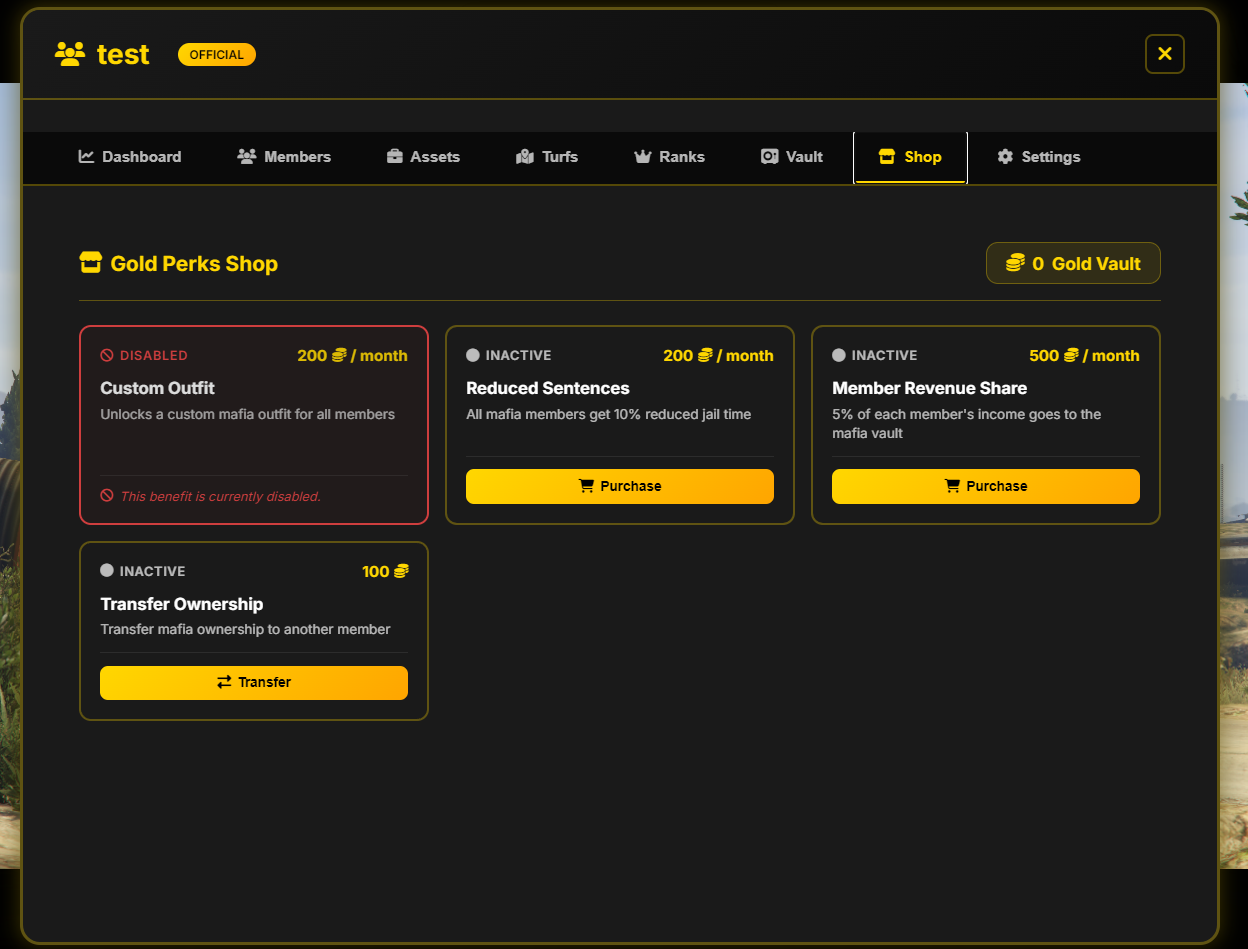
Activating a Perk
- Ensure sufficient funds in the Gold Vault.
- Click yellow Purchase next to the desired perk to activate it instantly for 30 days.
Laboratories and Drug System
Illegal production labs are randomly placed across certain turfs:
- Weed (see full guide in Weed Laboratory)
- Coke (see full guide in Coke Laboratory)
- Meth (see full guide in Meth Laboratory)
Delivery Schedule & Production Logic
- Delivery Schedule: Drug deliveries from laboratories can only be conducted between 16:00 – 00:00.
- Exclusive Access: You can produce and deliver drugs only if your mafia controls the turf where the laboratory is located. Losing the turf revokes access to production!
Rank System (Ranks Tab)
The Ranks tab provides full control over internal hierarchy, permissions, and administrative logs.
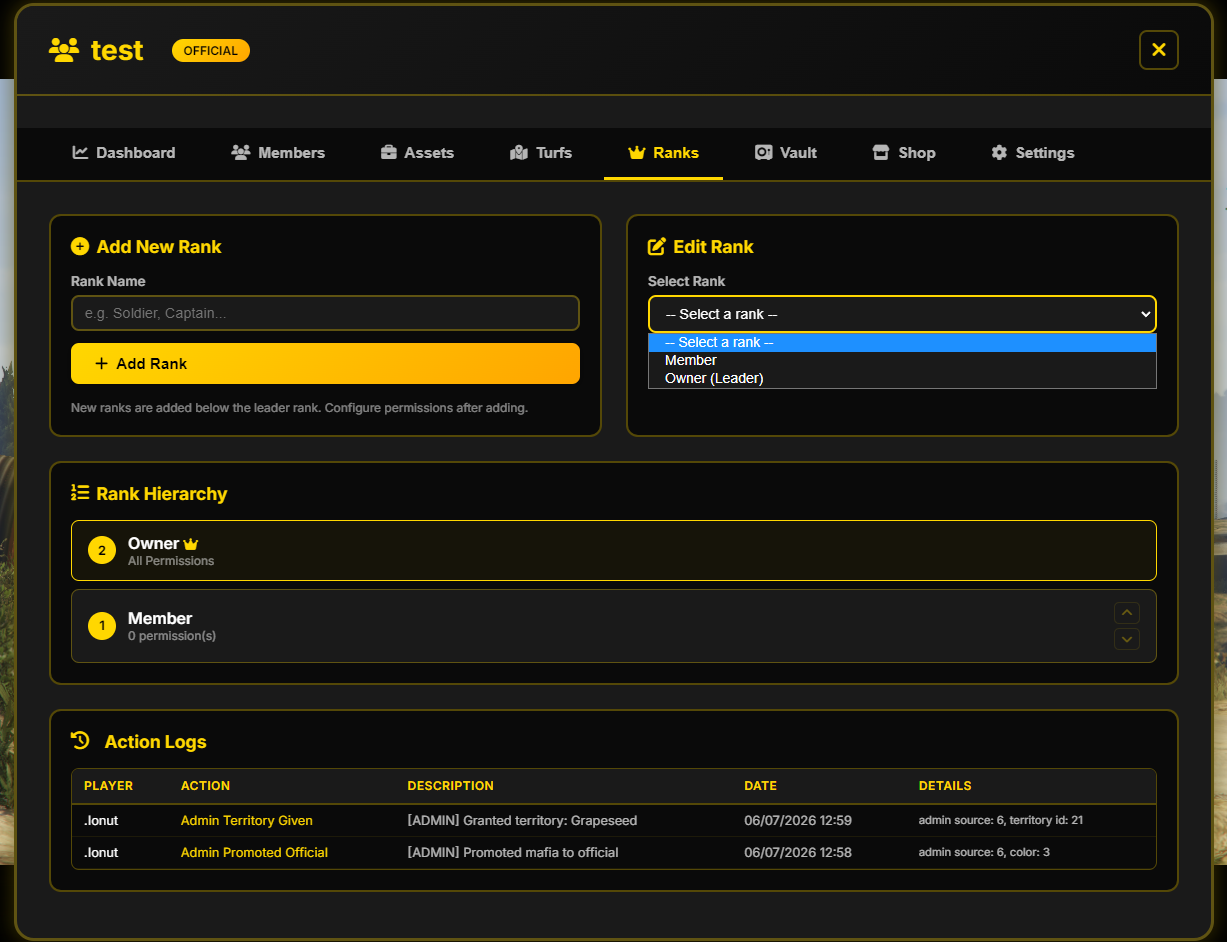
1. Add New Rank
Create new hierarchy levels by entering a Rank Name and clicking + Add Rank.
2. Edit Rank
Select an existing rank to toggle individual permissions:
- Deposit to Vault: Allow depositing into vault.
- Give Bonuses: Issue cash bonuses to members.
- Invite Members: Invite new recruits.
- Kick Members: Remove members from faction.
- Lock/Unlock Houses: Control property doors.
- Manage Business Prices: Adjust business pricing (fuel, paintball, etc.).
- Manage Businesses: Full administration over owned businesses.
- Manage Properties: Manage faction real estate.
- Manage Member Ranks: Promote, demote, or assign ranks.
- Manage Salaries: Set hourly salaries paid at Payday.
- Manage Vehicles: Purchase or sell fleet vehicles.
- Start Deliveries: Start drug delivery runs.
- Upgrade Houses: Purchase house upgrades.
- View Ranks & Logs: View ranks page and action logs.
- Withdraw from Vault: Withdraw cash from central vault.
3. Rank Hierarchy
Visual ordering of ranks from lowest to highest. Owner (Max rank) holds all permissions by default (marked with a yellow crown). Reorder intermediate ranks using up/down arrows.
4. Action Logs
Detailed administrative log tracking player actions, admin territory grants, promotions, and date/time stamps.
Faction Settings (Settings Tab)
The Settings tab opens Faction Settings for administrative and membership management.
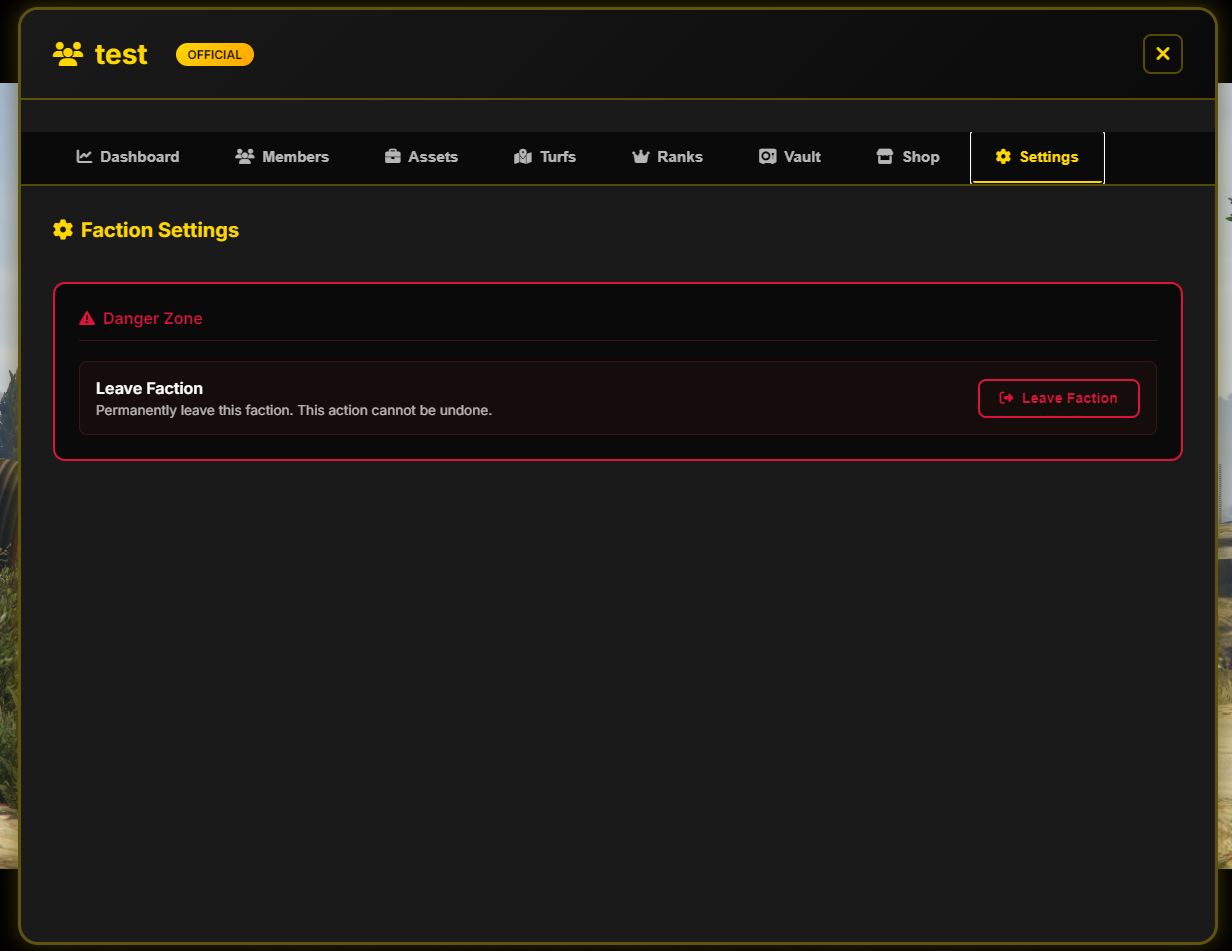
Danger Zone
A red warning box for critical actions:
- Leave Faction: Voluntarily leave the illegal organization ("Permanently leave this faction. This action cannot be undone.").
How to Leave the Faction
- Navigate to Settings in
/mafia. - Locate the Danger Zone and click red Leave Faction.
- Confirm the pop-up warning to permanently leave the faction.
Warehouse Robbery
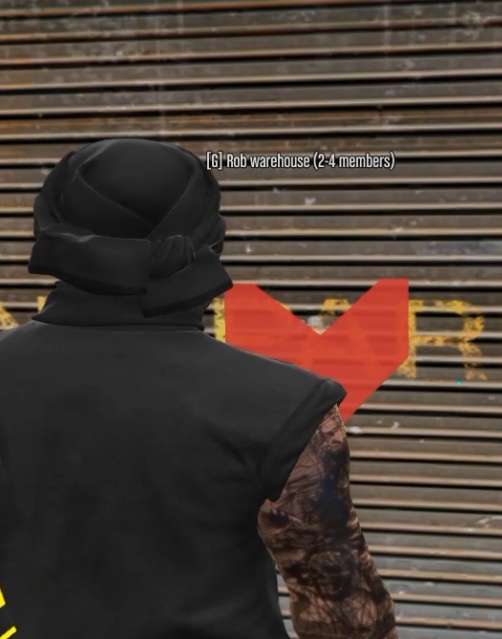
Warehouse robbery is a group illegal activity that allows mafias to raid stockpiles of confiscated materials (lockpicks, seeds, acetone, raw coca).
General Requirements and Rules
- Time Window: Warehouse robberies can only be initiated between 20:00 and 00:00.
- Mandatory Team: You need a minimum of 2 and a maximum of 4 crew members from your mafia to initiate a warehouse heist (
[G] Rob warehouse (2-4 members)). - Instant Wanted Level: The moment you trigger the door breach, all participants automatically receive Wanted Level 4, regardless of whether the action succeeds or fails.
- Time Limit & Alarm: Once inside, you have a general mission timer (e.g., 15 minutes) alongside a countdown until the local alarm triggers.
Step 1: Breaching the Warehouse
To gain access to the warehouse, the player who initiates the heist must complete a security minigame:
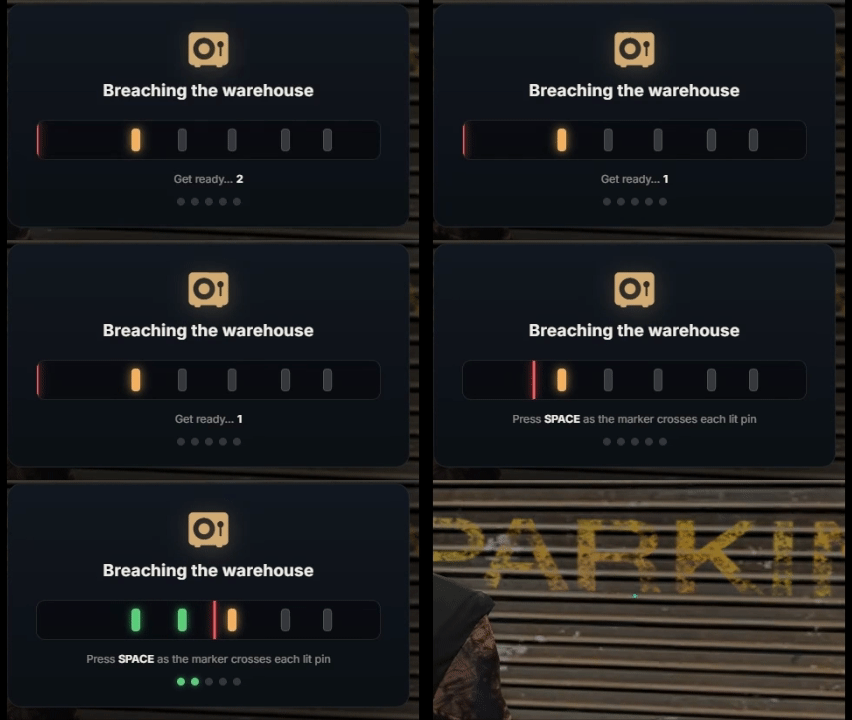
- Mechanic: Press the SPACE key precisely when the moving red indicator aligns between the markers of the yellow-highlighted pin.
- All set pins must be unlocked to open the warehouse door.
Step 2: Prying Crates & Loot Collection
Once inside the warehouse, you will find several large wooden crates containing the confiscated goods.
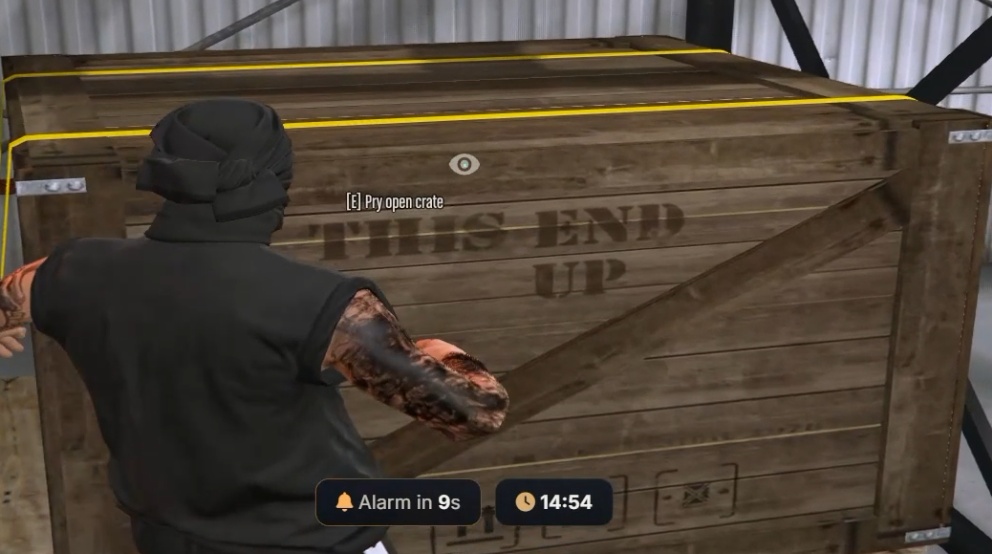
- Approach a crate and press the [E] Pry open crate key to start prying.
- A second minigame will be triggered (Prying the crate):
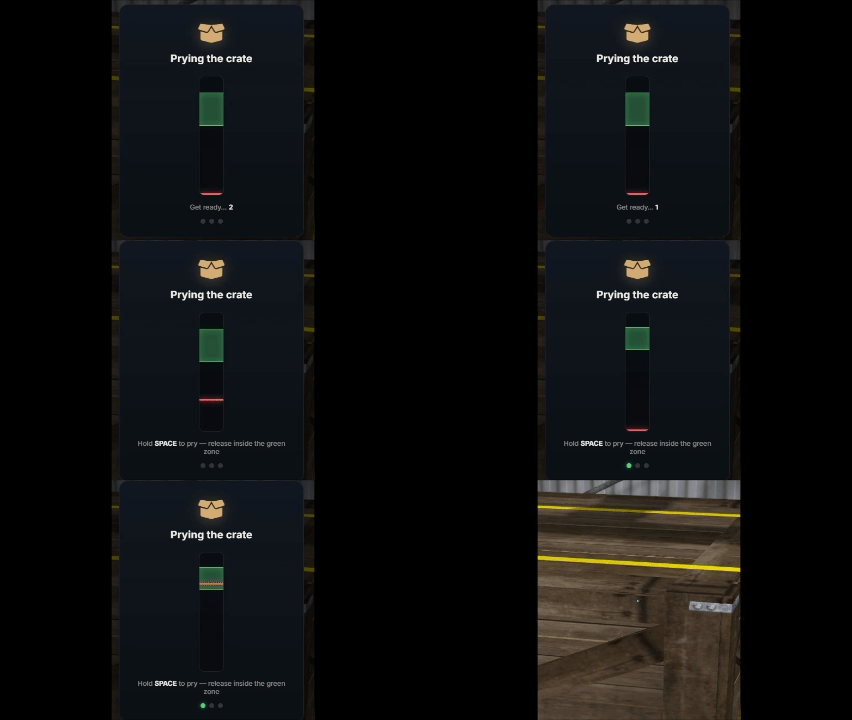
- Mechanic: Hold SPACE to build up pressure and release SPACE exactly when the gauge is inside the green zone (
Hold SPACE to pry — release inside the green zone).
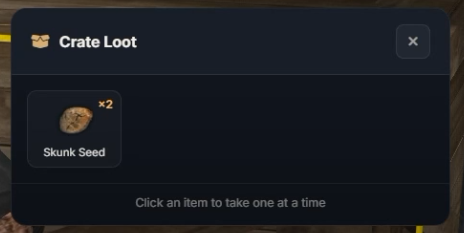
- Loot Collection: After unlocking, the Crate Loot window opens. Press the ALT key to enable the cursor and click on each item in the list to transfer them one piece at a time into your inventory (
Click an item to take one at a time).
Step 3: Exit Warehouse
After gathering all the items from the crates, head toward the emergency exit door/shutter marked in red on the map:
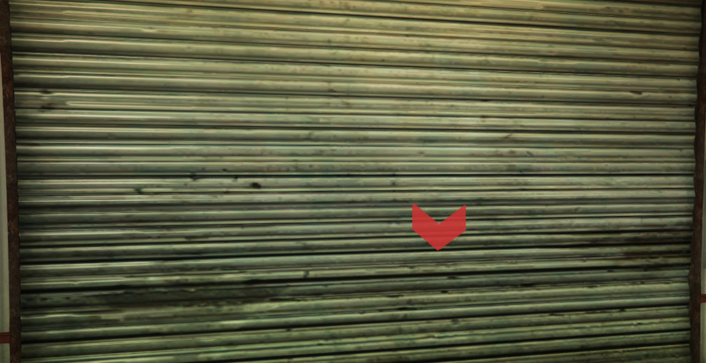
- Approach the marker and press [E] to leave the warehouse and flee the crime scene before police arrive.